> ## Documentation Index
> Fetch the complete documentation index at: https://docs.codejet.ai/llms.txt
> Use this file to discover all available pages before exploring further.
# How to add custom code to my project?
> Add custom code to your website to personalise your project
## Introduction
Adding custom codes to your Codejet project can enhance functionality.
This guide will walk you through the steps necessary to integrate custom code within the project settings.
**Steps to Add custom Code**
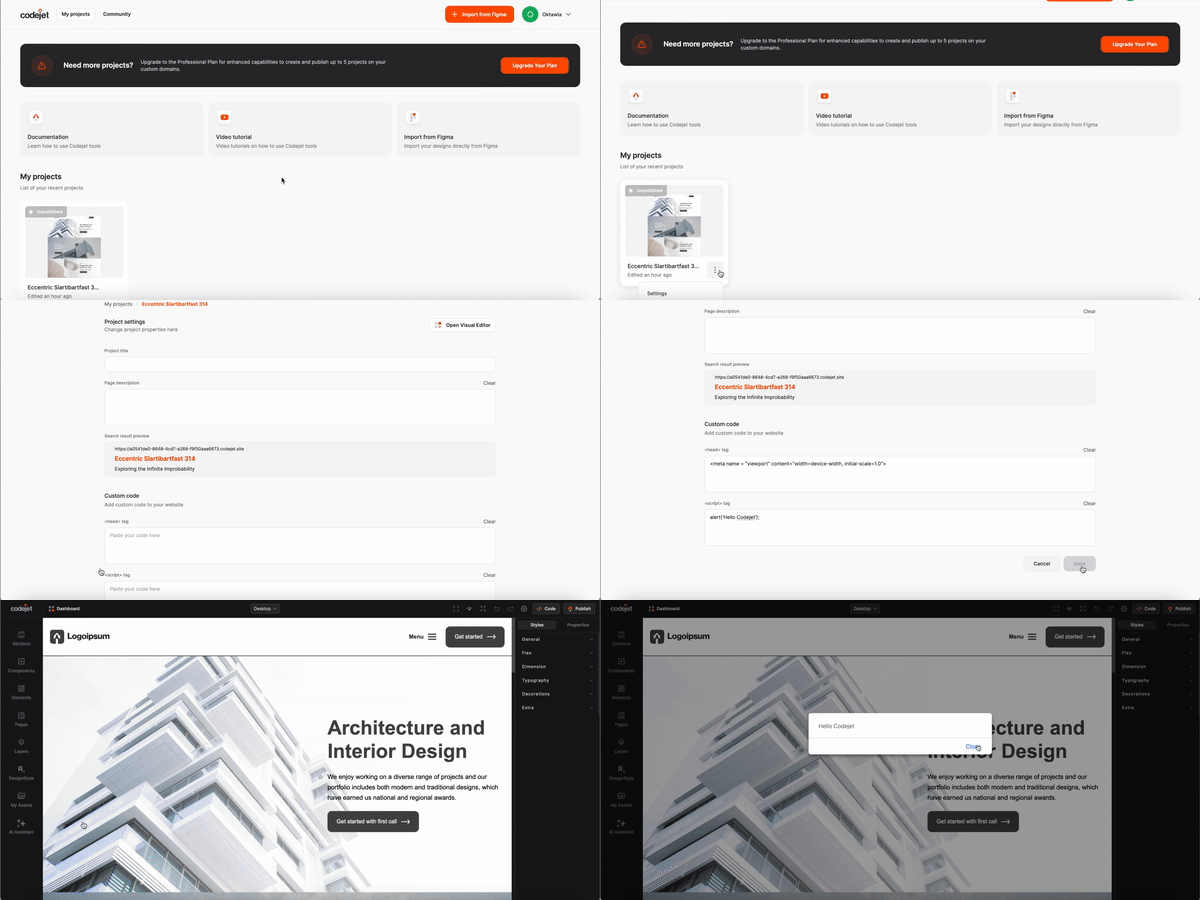
Click on your project and select gear icon – on the top menu
or from dashboard select project and click settings
In project setting menu, find the section add *"Custom Code"*
Input your custom script code in the provided text area
Save your changes
Ensure the script is correctly linked and applied to your project
Test your project to ensure the custom script runs as expected
**By following these steps, you can effectively add and manage custom scripts within your Codejet project, tailoring the functionality to meet your specific needs.**
### See how you can add custom code: